How to take a screenshot with your iPad
Press the Home and Sleep/Wake button simultaneously to take an iPad/iPhone screenshot
When you do that you’ll see the screen briefly flash and then afterward see the screenshot available in your Photos
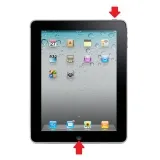
When you do that you’ll see the screen briefly flash and then afterward see the screenshot available in your Photos
Note: This isn't part of Less Meeting, but we find that many of our iPad/iPhone users find this info helpful. You might have noticed that you can't always add attendees to your iPad/iPhone Calendar events. If you're having trouble doing so, make sure you've setup your iPad/iPhone calendar app with
Read More