Skip to content
  • Features Update

Simplifying Things: Tutorial and Moving Notes

By Jeffrey Steinke

“Can you give us a tutorial?” 
“I’m having trouble moving notes around?”

Once again you asked and we listened.  LessMeeting updates keep coming - here are two new features that we’re excited to have rolled out over the holiday weekend.New Tutorial

Feel like you’re not utilizing LessMeeting to its full potential but don’t have time to read the manual?  The new tutorial walks you through the best features of the meeting page, including:

  • Tips about creating notes
  • Shortcuts for assigning action items
  • How to close out a meeting

New users will automatically see the tutorial after they sign up. Existing users can access the tutorial by clicking the Help link at the top and then clicking the “Take Tutorial” button.
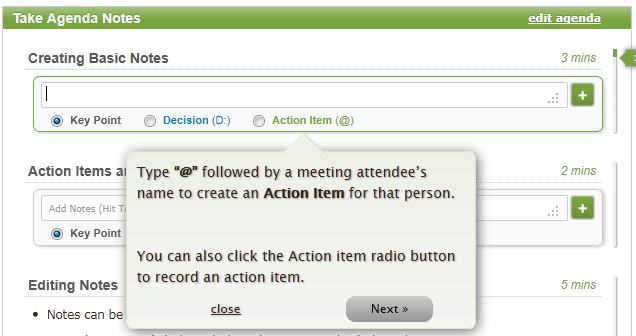
Want to learn the keyboard shortcut to add an action item?

Easier Drag/Drop

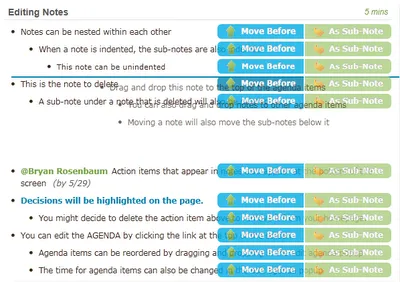
We have been looking for ways to make it easier to move notes and think we’ve found the solution. Now when you drag a note two buttons will appear: “Move Before” and “As Sub-Note”.  

Drag the note and drop it on one of those buttons to complete the move with greater precision.
Keep the suggestions coming, we love to hear from you. Email your ideas to Staff@LessMeeting.com or Tweet us @LessMeeting.

Share
    • Features Update

    Less Meeting Update - Improved Calendar Sync & Outlook Support

    As we wrap up our series on our latest release we have two under-the-hood calendar sync updates we're excited to announce. 1. Improved Calendar Integration We're consistently improving the calendar sync feature so that the meetings you see in Less Meeting match up with your calendar.While we've made

    By Jeffrey Steinke

    Read More
    • Features Update

    Less Meeting Update - International Date Support, Meeting Search & Teams

    Continuing with the updates from our latest release we have three more new features to show off. 1. International Date Support We're very excited to start displaying meeting dates & times in your localized format. Want your time shown in "dd/mm/yyyy" instead of "mm/dd/yyyy" format? No problem!

    By Jeffrey Steinke

    Read More
    • Features Update

    Less Meeting Update - Undo, New Linking Options & More Shortcuts

    We're excited as this week we've pushed out another huge Less Meeting update.There's a lot of great new features so we're spreading our updates out over a few posts so that you don't miss anything. Check out the details below and stay tuned to future updates coming this week... 1. Undo Accidental No

    By Jeffrey Steinke

    Read More