- Using Less Meeting
How To: Add Agendas & Tags to Google Calendar Meeting Invites
By Jeffrey Steinke
We’ve been asked a few times recently how to add Tags and Agendas to meetings in Google Calendar.
Sounds like a perfect topic for a blog post.
Why Add a Plan in Google Calendar?
Sure you can add tags & agendas directly in Less Meeting. Do this in Google Calendar when you create your invite, though, and reduce the number of steps it takes to create a new meeting.
And if you’re trying to run better meetings, you’ll also know that sending out the meeting plan to attendees before the meeting is a must.
Ok I’m In, How Do I Add a Plan to GCal?
It’s super straight forward. Just follow these 2 steps:
1. Sync your Less Meeting & Google Calendar accounts. Do that here
2. Type out your Agenda & Tags in the description, like this:
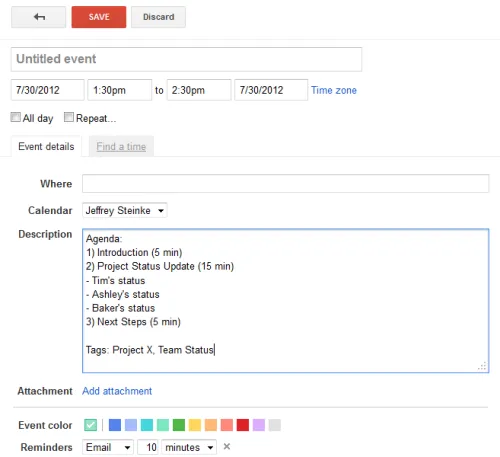
How to Format Your Agenda & Tags
When typing out your plan there are some simple format requirements.
Agendas\
- Start with the text, “Agenda:”\
- Add the agenda number followed by a right parenthesis. Like this, “1)”, “2)”, and so on\
- Optional: add each agenda length. Format is “(X min)” where X is the number of minutes\
- Optional: add sub-agendas. Format is ”- ” followed by the title
Tags\
- Start with the text, “Tags:”\
- Separate each tag with a comma\
- Add as many tags as you want
That’s all there is to it. Less Meeting does the rest, automatically reading your plan and adding it to your meeting.
Enjoy!