- Features Update
Super Simple Evernote Integration with Less Meeting
By Jeffrey Steinke

Evernote is one of the best tools we’ve found for managing all the thoughts & ideas in our lives - both at work and at home.
And Evernote does a great job of making all those notes:
- easy to find
- available anywhere
- available from any device
But at the end of the day Evernote is just a basic notes tool and doesn’t help you plan, run & follow up on your meetings. Which is of course why you use Less Meeting.
The problem is that all your work needs to be in Evernote - including Meeting Minutes -in order for it to actually be easy to find.
Well, did you know there’s a dead simple way to add your Less Meeting Meeting Minutes to Evernote?
All you have to do is add your Evernote Email ID to your Meeting Minutes. Here’s how…
1. Get Your Evernote Email ID
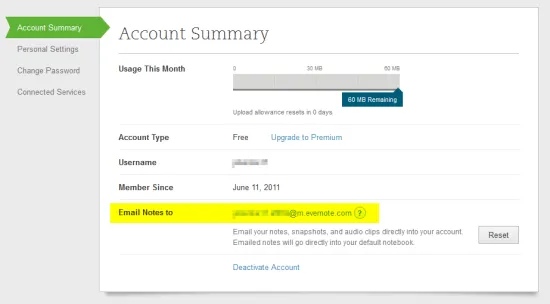
Go to your account settings page in Evernote and find the “Email notes to” section. This shows your Evernote Email ID.
2. Run Your Meeting in Less Meeting
Start your meeting, take some notes, and click “End Meeting” when you’re ready to send the Minutes.

3. Add your Evernote Email to the Meeting Minutes
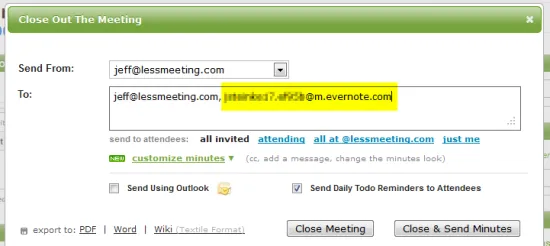
Grab your Evernote email address and add it as a recipient of the Meeting Minutes, such as in the “To:“section.
4. Voila!! See Your Meeting Minutes in Evernote
Your Meeting Minutes will show up instantly with all the original Less Meeting formatting. On top of that they’re fully editable so you can modify any notes you need.
Bonus: Add Tags & Notebooks Filters
Evernote will also automatically apply any Tags or Notebook labels added to the Email Subject. Simply add these to the end of your Meeting Title in Less Meeting so that they show up on the Email Subject line. (get more details from Evernote here)
- Use @ for notebooks: Use an @ symbol followed by the name of your destination notebook
- Use # for tags: Use a # symbol followed by the tag(s) you wish to assign. You can have multiple tags, just make sure each one starts with a #
We’re still looking for a good way to manage to-dos in Evernote though, so if you’ve found a way please share it with us.
New to Less Meeting? Get your free Less Meeting account here. And double your note taking powers with a free Evernote account too.