- Features Update
New iPad/iPhone Release: Edit/Delete Meetings, Custom Minutes, Help & More
By Jeffrey Steinke
Happy New Year part II!Last week we announced an updated Outlook plugin and this week we’ve got more new stuff on the way for you.
This time around it’s v2 of our iPad & iPhone apps!
After our initial app release at the end of last year we got some fantastic feedback. Long time Less Meeting users pointed us toward some of their favorite web features that we’d left out, and first time Less Meeting-ers gave some great new insight and perspective.
Editing and Deleting Huddles and Meetings
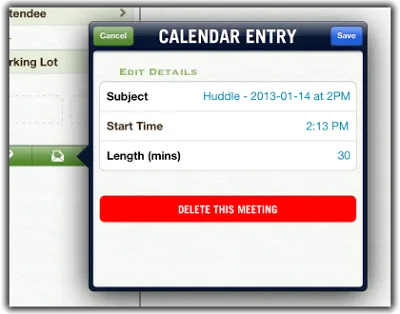
Easily the #1 request was the ability to edit Huddle times & subjects. In a close 2nd were requests to delete old huddles you don’t want anymore. Even though you could do this from the web, we missed a key feature by not including this in the mobile apps.
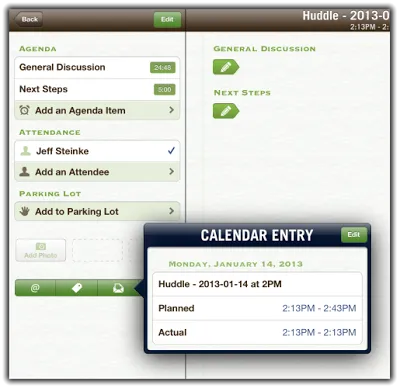
To edit or delete your meeting, tap the Calendar Entry icon from the meeting and then tap Edit from the popup.
Brand Your Meeting Minute Emails
Love having your notes get sent out right after the meeting, but want more control over the meeting minutes email? New email template options now let you pick:
-
Who gets the email
-
Which meeting notes are included
-
The branding of the email (e.g. pick your own colors & logos)
You’ll see these options next time you tap Send Minutes from your iPad or iPhone.
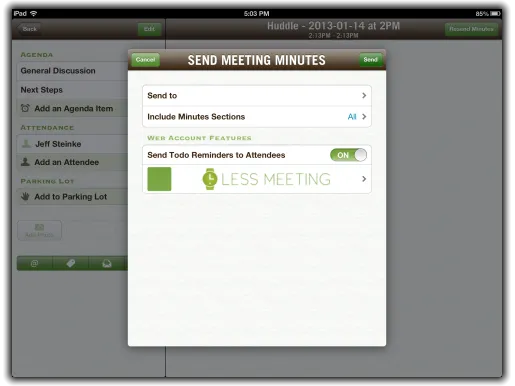
Note: You’ll need a web account to take advantage of meeting minute email branding.
Instant Help at Your Fingertips
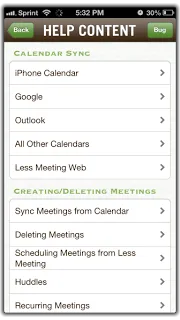
To help you get the most out of the mobile apps we added some common FAQs and an overview of favorite features right into the app.
Access the help menu from the Settings tab or the help icon on your meeting page.
Update iOS 6 Permissions to Fix Crashing
Unfortunately some users experienced occasional crashing when trying to sync their calendars or contacts. If you’ve seen crashes during these activities download the latest version of the app.
And of course we’ve added some smaller tweaks, improvements, and bug fixes that you’ll notice as well. We’ve improved the device calendar sync, added an in-meeting view of related action items to the iPhone (was already on the iPad), improved performance, and more…
Don’t have the Less Meeting iPad or iPhone apps yet? They’re free and no account is needed, so why not? Download the app to start running productive meetings today.