- Meeting Tips
- Using Less Meeting
Meeting Key Performance Indicators
By Blake Byrnes
At LessMeeting, we want you to be able to see what happened for any meeting at a glance:\
- Decisions: √\
- Actions: √\
- Notes: √\
- Overall Quality: √So when we started hearing from customers that they wanted to take this further to the Key Performance Indicators they were reviewing in meetings, we took notice.
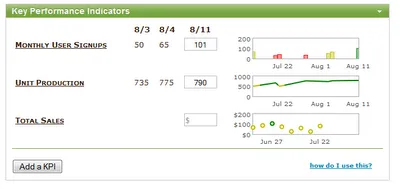
Was this a key piece of meetings we were missing?
Question 1: Why would you want to add KPI data into LessMeeting?
You probably already have your indicators in a Spreadsheet somewhere, or sometimes a whole KPI Database. So what motivates you to add them to a meeting?
- Quick “inline” visibility to the health of your indicators.\
- See trends and problem areas projected in a conference room and in the notes that get sent out.\
- Disseminate Data\
- An ability to get/reference information coming out of meetings has opened many customers’ eyes to the value of just how many people get on board this way.\
- One Place\
- By uploading your metrics to a meeting page, and referencing high level values inline, all of your meeting data is available in one place.
Question 2: How do you make this simple enough?
KPIs have all kinds of methodology behind them: goals, targets, milestones, target lines, trends, statistics, etc.
Simple, but useful: we wanted something that you could setup in a few seconds, and wouldn’t take 2 hours to understand. That said, we still wanted it to be able to convey important information about KPI health in an instant.
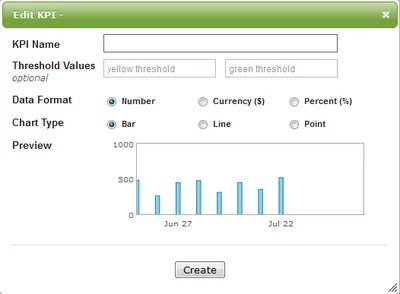
- Adding KPIs\
- Name: what are you tracking\
- Thresholds: when do you want to show red, green, and yellow. This is optional, so you can just show a trend graph if you want.\
- Chart Type: bar, line or point\
- Data Type: format my data as $, % or just a plain number
… that’s it. We take care of the rest\
- Updating KPI Vaues\
- We decided that KPIs in LessMeeting make the most sense as an addition to Recurring Meetings. So to add/input values for your KPIs, you simply navigate between meetings and add your data point. Everything will update in realtime.
Question 3: What KPIs should I track?
Key Performance Indicators are for tracking really important variables that indicate the health of your business. For LessMeeting, KPIs are:
- Daily Uniques - how many people are coming to the site\
- Conversion Rates - what percent of visitors are signing up for an account\
- Monthly Revenue - how much are we generating in sales/month\
- Monthly Costs - how much is our combined Ad Spend, Hosting costs, Development Costs, and Employee Costs\
- Daily Meetings Run in LessMeeting - how much is the tool getting used by our existing users
Your business KPIs might be things like: Calls Answered in the First Minute, Production Outages, Tickets Logged, Tickets Resolved, Pre-Tax Profit, etc, etc
Try to think through what is CRITICAL to reviewing in a particular meeting. Most meetings needing KPI reviews will be recurring status meetings around a particular area of your business.
Focus on what makes that part of your business tick.
That’s all for now! We’ll be releasing KPIs in a few days, so try them out and let us know what you think.