- Features Update
New Release – New features: Linking, Instant Meeting, Mark Private
By Brett Cooper
As some of our users have noticed, LessMeeting released a new version yesterday. LessMeeting 2.0.6 includes a number of changes and improvements that our users have asked for. We are really exited about these features and would love to hear your feedback on them or other feature ideas you have.
Link Meetings
Many people have found that LessMeeting provides a lot of value in recurring meetings by keeping track of action items. We have now added the ability to link individual meetings together so that they function just like recurring meetings by tracking agenda items.
For example, if you have a preliminary meeting to discuss the FY11 bud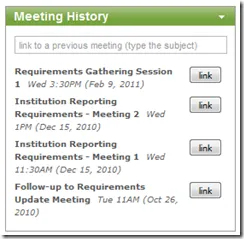 get on Monday and have a follow-up meeting on Friday, those two meetings can be linked. Any action items assigned to people on Monday will appear in the Friday meeting.
To link these two meetings, you would go to the meeting page of the Friday meeting and click the “Link” button in the Meeting History box on the bottom-right of the screen. The meetings that automatically appear in this box share common tags, but you can also search for any meeting by subject.
Create Instant Meeting from Website
On the Dashboard webpage you will notice that there’s a New Meeting button that 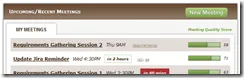 allows you to create a meeting directly from the LessMeeting website. This means that if you don’t have Outlook available and need to schedule a meeting on the fly, you can do so directly from the website.
Notification Timing
We received feedback that the notifications popups were showing up too frequently (every time a meeting reminder appeared). Clicking the snooze button would cause the notification to appear multiple times for the same meeting. We have changed the notifications so now they only will appear if a reminder occurs less than 5 minutes prior to the meeting.
Private Meetings
We realize that not all events on your calendar are for work purposes. Clicking the Private button in Outlook before you create the meeting means that this meeting 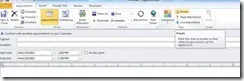 will not appear on the Dashboard or the Meetings page. It will also not appear in any Team data analytics.